MusicSeerr [![License: AGPL-3.0](https://img.shields.io/badge/license-AGPL--3.0-blue.svg)](LICENSE) [![Docker](https://img.shields.io/badge/docker-ghcr.io-blue?logo=docker)](https://github.com/habirabbu/musicseerr/pkgs/container/musicseerr) [![Discord](https://img.shields.io/discord/1356702267809808404?label=discord&logo=discord&logoColor=white)](https://discord.gg/f98bFfsPuB) [![Docs](https://img.shields.io/badge/docs-musicseerr.com-blue)](https://musicseerr.com/) [![ko-fi](https://ko-fi.com/img/githubbutton_sm.svg)](https://ko-fi.com/M4M41URGJO)

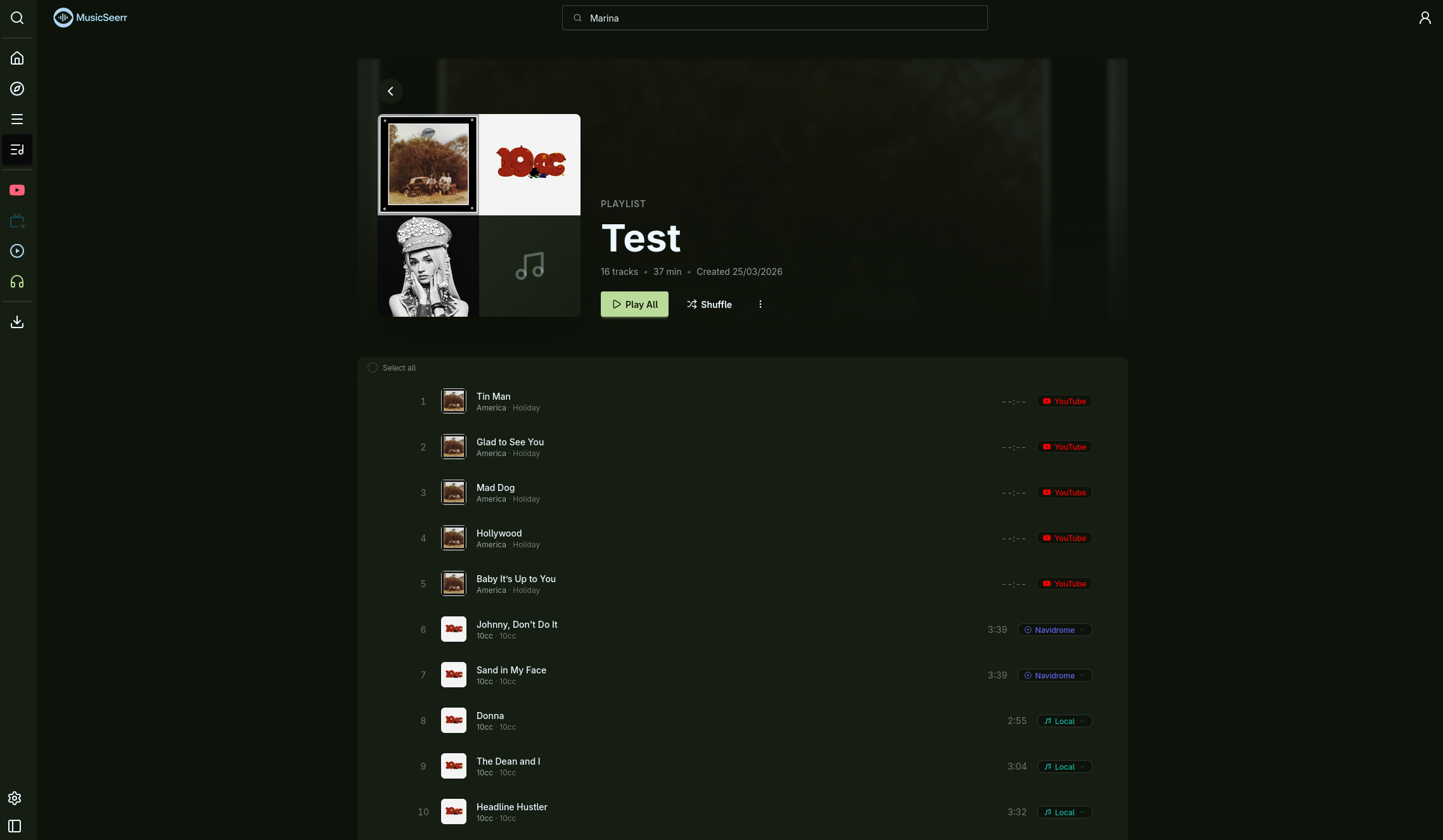
--- MusicSeerr is a self-hosted music request and discovery app built around [Lidarr](https://lidarr.audio/). Search the full MusicBrainz catalogue, request albums, stream music from Jellyfin, Navidrome, or your local library, discover new albums based on your listening history, and scrobble everything to ListenBrainz and Last.fm. The whole thing runs as a single Docker container with a web UI for all configuration. --- ## Screenshots Home page with trending artists, popular albums, and personalized recommendations Artist detail page with biography, discography, and similar artists Album detail page with tracklist, playback controls, and request button Discover page with personalized album recommendations
More screenshots Search results for artists and albums Library overview with statistics and recent additions Playlist with tracklist and playback controls Discover queue with album recommendations to request or skip Local files library with format and storage stats Navidrome library view YouTube linked albums for streaming User profile with connected services and library stats
--- ## Quick Start You need Docker and a running [Lidarr](https://lidarr.audio/) instance with an API key. ### 1. Create a docker-compose.yml ```yaml services: musicseerr: image: ghcr.io/habirabbu/musicseerr:latest container_name: musicseerr environment: - PUID=1000 # Run `id` on your host to find your user/group ID - PGID=1000 - PORT=8688 - TZ=Etc/UTC # Your timezone, e.g. Europe/London, America/New_York ports: - "8688:8688" volumes: - ./config:/app/config # Persistent app configuration - ./cache:/app/cache # Cover art and metadata cache # Optional: mount your music library for local file playback. # The left side should match the root folder Lidarr uses. # The right side (/music) must match "Music Directory Path" in Settings > Local Files. # - /path/to/music:/music:ro restart: unless-stopped healthcheck: test: ["CMD", "curl", "-f", "http://localhost:8688/health"] interval: 30s timeout: 10s start_period: 15s retries: 3 ``` ### 2. Start it ```bash docker compose up -d ``` ### 3. Configure Open [http://localhost:8688](http://localhost:8688) and head to Settings. Add your Lidarr URL and API key, then connect whichever streaming and discovery services you use. --- ## Recommended Stack MusicSeerr is designed to work with Lidarr. If you're putting together a music stack from scratch, this combination covers most needs: | Service | Role | |-|-| | [Lidarr](https://lidarr.audio/) (nightly recommended) | Library management, download orchestration | | [slskd](https://github.com/slskd/slskd) | Soulseek download client | | [Tubifarry](https://github.com/Tubifarry/Tubifarry) | YouTube-based download client for Lidarr | Lidarr is the only requirement. slskd and Tubifarry are optional but between them they cover most music sourcing needs. For playback, connect Jellyfin, Navidrome, or mount your music folder directly into the container. --- ## Features ### Search and Request Search the full MusicBrainz catalogue for any artist or album. Request an album and Lidarr handles the download. A persistent queue tracks all requests, and you can browse pending and fulfilled requests on a dedicated page with retry and cancel support. ### Built-in Player MusicSeerr has a full audio player that supports multiple playback sources per track: - Jellyfin, with configurable codec (AAC, MP3, FLAC, Opus, and others) and bitrate. Playback events are reported back to Jellyfin automatically. - Navidrome, streaming via the Subsonic API. - Local files, served directly from a mounted music directory. - YouTube, for previewing albums you haven't downloaded yet. Links can be auto-generated or set manually. The player supports queue management, shuffle, seek, volume control, and a 10-band equalizer with presets. ### Discovery The home page shows trending artists, popular albums, recently added items, genre quick-links, weekly exploration playlists from ListenBrainz, and "Because You Listened To" carousels personalized to your history. The discover page goes further with a recommendation queue drawn from similar artists, library gaps, fresh releases, global charts, and your listening patterns across ListenBrainz and Last.fm. Each album can be expanded to show the full tracklist and artwork before you decide to request or skip it. You can also browse by genre, view trending and popular charts over different time ranges, and see your own top albums. ### Library Browse your Lidarr-managed library by artist or album with search, filtering, sorting, and pagination. View recently added albums and library statistics. Remove albums directly from the UI. Jellyfin, Navidrome, and local file sources each get their own library view with play, shuffle, and queue actions. ### Scrobbling Every track you play can be scrobbled to ListenBrainz and Last.fm simultaneously. Both are toggled independently in settings. A "now playing" update goes out when a track starts, and a scrobble is submitted when it finishes. ### Playlists Create playlists from any mix of Jellyfin, Navidrome, local, and YouTube tracks. Reorder by dragging, set custom cover art, and play everything through the same player. ### Profile Set a display name and avatar, view connected services, and check your library statistics from a profile page. --- ## Integrations | Service | What it does | |-|-| | [Lidarr](https://lidarr.audio/) | Download management and library syncing | | [MusicBrainz](https://musicbrainz.org/) | Artist and album metadata, release search | | [Cover Art Archive](https://coverartarchive.org/) | Album artwork | | [TheAudioDB](https://www.theaudiodb.com/) | Artist and album images (fanart, banners, logos, CD art) | | [Wikidata](https://www.wikidata.org/) | Artist descriptions and external links | | [Jellyfin](https://jellyfin.org/) | Audio streaming and library browsing | | [Navidrome](https://www.navidrome.org/) | Audio streaming via Subsonic API | | [ListenBrainz](https://listenbrainz.org/) | Listening history, discovery, scrobbling, weekly playlists | | [Last.fm](https://www.last.fm/) | Scrobbling and listen tracking | | YouTube | Album playback when no local copy exists | | Local files | Direct playback from a mounted music directory | All integrations are configured through the web UI. No config files or environment variables needed beyond the basics listed below. --- ## Configuration MusicSeerr stores its config in `config/config.json` inside the mapped config volume. Everything is managed through the UI. ### Environment Variables | Variable | Default | Description | |-|-|-| | `PUID` | `1000` | User ID for file ownership inside the container | | `PGID` | `1000` | Group ID for file ownership inside the container | | `PORT` | `8688` | Port the application listens on | | `TZ` | `Etc/UTC` | Container timezone | Run `id` on your host to find your PUID and PGID values. ### In-App Settings | Setting | Location | |-|-| | Lidarr URL, API key, profiles, root folder, sync frequency | Settings > Lidarr | | Jellyfin URL and API key | Settings > Jellyfin | | Navidrome URL and credentials | Settings > Navidrome | | Local files directory path | Settings > Local Files | | ListenBrainz username and token | Settings > ListenBrainz | | Last.fm API key, secret, and OAuth session | Settings > Last.fm | | YouTube API key | Settings > YouTube | | Scrobbling toggles per service | Settings > Scrobbling | | Home page layout preferences | Settings > Preferences | | AudioDB settings and cache TTLs | Settings > Advanced | ### Setting Up Last.fm 1. Register an app at [last.fm/api/account/create](https://www.last.fm/api/account/create) to get an API key and shared secret. 2. Enter them in Settings > Last.fm. 3. Click Authorise and follow the redirect. You'll be returned to MusicSeerr automatically. ### Setting Up ListenBrainz 1. Copy your user token from [listenbrainz.org/profile](https://listenbrainz.org/profile/). 2. Enter your username and token in Settings > ListenBrainz. ### TheAudioDB AudioDB provides richer artist and album artwork from a fast CDN. It's enabled by default with the free public API key, which is rate-limited to 30 requests per minute. Premium keys from [theaudiodb.com](https://www.theaudiodb.com/) unlock higher limits. Under Settings > Advanced, you can toggle AudioDB on or off, switch between direct CDN loading and proxied loading (for privacy), enable name-based search fallback for niche artists, and adjust cache TTLs. --- ## Playback Sources ### Jellyfin Audio is transcoded on the Jellyfin server and streamed to the browser. Supported codecs include AAC, MP3, Opus, FLAC, Vorbis, ALAC, WAV, and WMA. Bitrate is configurable between 32 kbps and 320 kbps. Playback start, progress, and stop events are reported back to Jellyfin. ### Local Files Mount your music directory into the container and MusicSeerr serves files directly. The mount path inside the container must match the Music Directory Path set in Settings > Local Files. ```yaml volumes: - /path/to/your/music:/music:ro ``` ### Navidrome Connect your Navidrome instance under Settings > Navidrome. ### YouTube Albums can be linked to a YouTube URL and played inline. This is useful for listening to albums before you've downloaded them. Links can be auto-generated with a YouTube API key or added manually. A note on reliability: YouTube playback depends on the embedded player, which can be finicky. It works best in a browser where you're signed into YouTube, and VPNs tend to cause issues. Treat it as a convenience for previewing albums rather than a primary playback source. --- ## Volumes and Persistence | Container path | Purpose | |-|-| | `/app/config` | Application config (`config.json`) | | `/app/cache` | Cover art cache, metadata cache, SQLite databases | | `/music` (optional) | Music library root for local file playback | Map both `/app/config` and `/app/cache` to persistent host directories so they survive container restarts. --- ## API Interactive API docs (Swagger UI) are available at `/api/v1/docs` on your MusicSeerr instance. A health check endpoint is at `/health`. --- ## Development The backend is Python 3.13 with FastAPI. The frontend is SvelteKit with Svelte 5, Tailwind CSS, and DaisyUI. ### Backend ```bash cd backend pip install -r requirements-dev.txt uvicorn main:app --reload --port 8688 ``` ### Frontend ```bash cd frontend npm install npm run dev ``` ### Tests A root Makefile wraps the test commands: ```bash make backend-test # full backend suite make frontend-test # full frontend suite make test # both make ci # tests + linting + type checks ``` Frontend browser tests use Playwright. Install the browser with: ```bash make frontend-browser-install ``` --- ## Support Documentation is at [musicseerr.com](https://musicseerr.com/). For questions, help, or just to chat, join the [Discord](https://discord.gg/f98bFfsPuB). Bug reports and feature requests go on [GitHub Issues](https://github.com/habirabbu/musicseerr/issues). If you find MusicSeerr useful, consider supporting development: [![ko-fi](https://ko-fi.com/img/githubbutton_sm.svg)](https://ko-fi.com/M4M41URGJO) --- ## License [GNU Affero General Public License v3.0](LICENSE)